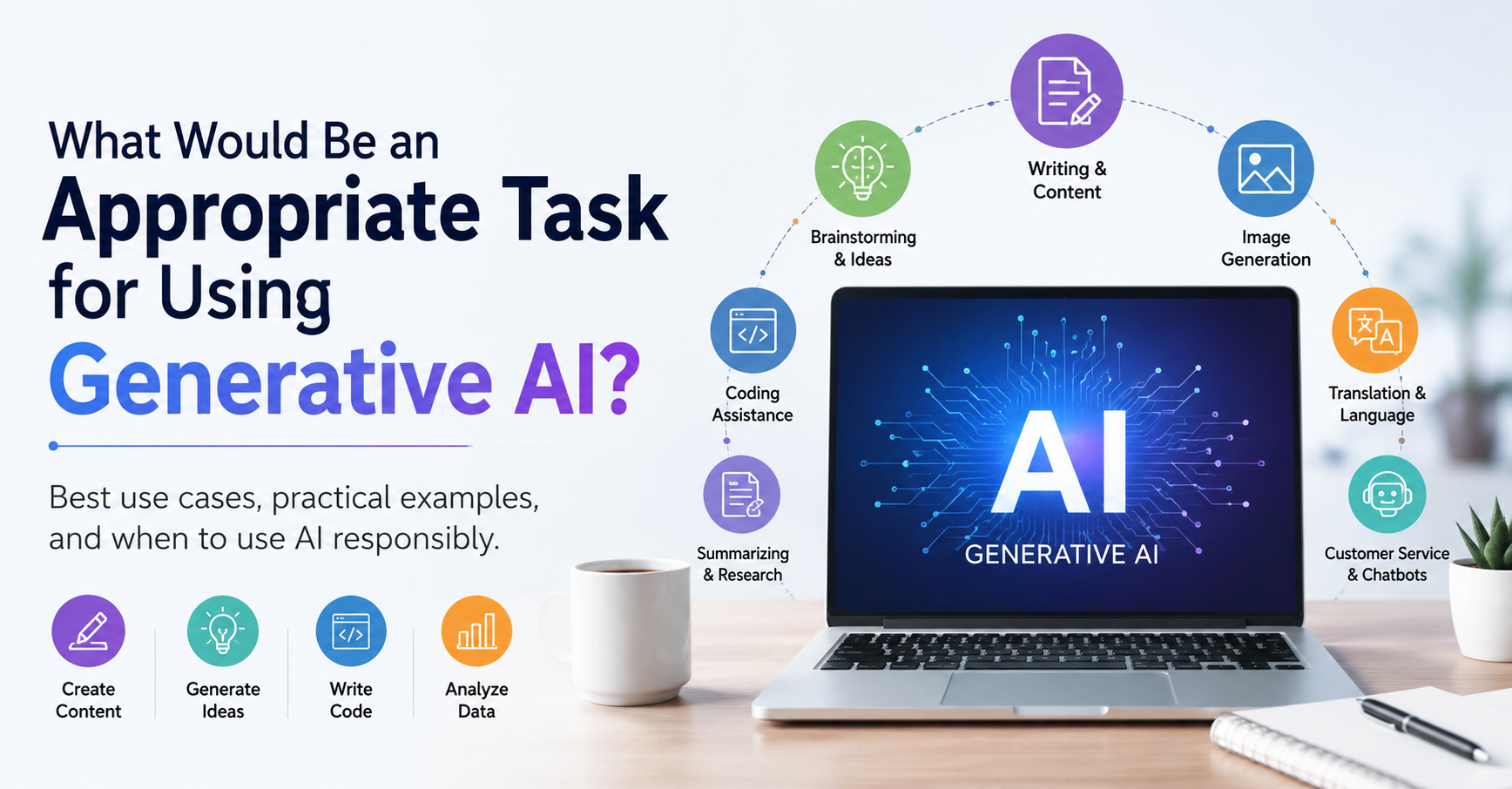
An appropriate task for generative AI is one where AI creates a first draft or a set of options, and a human reviews the result before it’s used. Good examples include drafting an email, \brainstorming ideas, summarizing a long document, and outlining a presentation. Tasks that involve final decisions, confidential data, or facts nobody will verify are not appropriate.
Answering this as a quiz question? Look for the option where AI produces a draft and a person stays responsible for the outcome. That is almost always the correct choice.
Below you’ll find the four traits that make a task a good fit, nine real-world examples, the tasks to avoid, and a five-question test you can apply to anything.
What Makes a Task Appropriate for Generative AI?
Generative AI tools, such as ChatGPT, Google Gemini, Claude, and Microsoft Copilot, are built on large language models (LLMs). They predict likely text, images, or code from your prompt. That makes them fast at producing drafts, but it also means they can state false information confidently. This failure is called a hallucination. A good task plays to the strength and contains the weakness.
Most appropriate tasks share four traits.
1. It creates, transforms, or organizes content
Generative AI is strongest when it produces something new or reshapes material you already have. Drafting, rewriting, summarizing, outlining, and generating options all fit this pattern.
2. A human can review the output before it’s used
The safest tasks produce something a person can read, check, and edit. An email draft is easy to review. An automated message sent straight to 10,000 customers is not.
3. Mistakes would be easy to catch and cheap to fix
If a brainstormed headline is weak, you pick another one. If a contract clause is wrong, the cost could be serious. The lower the cost of an error, the better the fit.
4. AI supports the decision but doesn’t make it
AI can lay out options, pros and cons, or a summary of the facts. The final call on anything with real consequences should stay with a person. This approach is often called human-in-the-loop, and it is central to frameworks like the NIST AI Risk Management Framework.
9 Appropriate Tasks for Generative AI (With Examples)
Each example below includes a sample prompt and the one risk that matters most for that task.
1. Drafting emails and business writing
Give AI your key points and let it turn them into a clear, professional message. This works well for meeting follow-ups, project updates, internal announcements, and first drafts of proposals.
Example prompt: “Turn these three points into a friendly, concise email to a client confirming next Tuesday’s call.”
Main risk: AI may invent or mix up names, dates, and numbers. Check every detail before you hit send.
Real-world evidence: In a 2023 MIT experiment published in Science, 453 college-educated professionals completed writing tasks such as cover letters and sensitive workplace emails. Those given ChatGPT finished about 40% faster, and independent graders rated their work 18% higher. The researchers noted a key limit: the tasks didn’t require precise factual accuracy. That is exactly why a human still needs to check the details.
2. Brainstorming ideas and outlines
AI is excellent at beating the blank page. Ask for 20 blog topics, 10 headline options, or a logical structure for a presentation. Then keep the best ideas and discard the rest.
Example prompt: “Suggest a five-section outline for a 10-minute class presentation on the causes and effects of climate change.”
Main risk: AI ideas tend to be generic because they reflect what is already common. Your judgment is what makes the final choice original.
3. Summarizing, rewriting, and translating text
AI can condense a 20-page report into key points, simplify technical language, adjust tone for a new audience, or translate everyday text into another language.
Example prompt: “Summarize this report in five bullet points, and list any decisions it asks the reader to make.”
Main risk: Summaries can drop important details, and translations can miss nuance. Keep the original on hand. For legal, medical, or government documents, use a professional human translator.
Real-world warning: In 2023, Samsung engineers pasted confidential material into ChatGPT, including internal source code and notes from a meeting they wanted turned into minutes. The company responded by temporarily banning generative AI tools on work devices. Summarizing is a great use of AI, but only with a tool your company has approved for that data.
4. First drafts of marketing content
Marketers use AI for product descriptions, social media captions, ad concepts, email campaign ideas, and content calendars. It is especially useful for creating variations of one message for different audiences.
Example prompt: “Write three versions of this product description: one for busy parents, one for college students, and one for small business owners.”
Main risk: AI can produce exaggerated or unsupported claims. In the U.S., the FTC expects marketing claims to be truthful and backed by evidence, whoever wrote them. Check claims and brand voice before publishing.
5. Coding help and debugging
Developers and students use tools like GitHub Copilot or a general AI assistant to explain unfamiliar code, suggest snippets, write documentation, generate test cases, and interpret error messages.
Example prompt: “Explain what this error message means and suggest three likely causes I should check first.”
Main risk: AI-generated code can contain security flaws, outdated methods, or subtle bugs. Review and test everything before it goes into production.
Real-world evidence: In a controlled experiment run by GitHub, developers using Copilot finished a coding task 55% faster than those without it, averaging 1 hour 11 minutes versus 2 hours 41 minutes. Keep in mind this was a single, well-defined task measured by the tool’s own maker. Real projects with security and review requirements will see smaller gains.
6. Images and visual concepts
In the early stages of a creative project, AI image generators help teams explore styles, moods, and layouts quickly before committing to a direction.
Example prompt: “Create four concept sketches for a minimalist coffee shop logo using warm earth tones.”
Main risk: Copyright and ownership. The U.S. Copyright Office has addressed how copyright applies to AI-generated material, and purely AI-generated work may not be protected. Also check your tool’s licensing terms before commercial use.
7. Organizing research and interpreting data
AI can sort notes into categories, suggest research questions, compare concepts, describe trends in a dataset you provide, and explain statistical terms in plain English.
Example prompt: “Group these 30 customer comments into themes and count how many fall under each one.”
Main risk: AI may invent sources, citations, or statistics. Treat it as an organizer, not a source of facts, and verify key findings against primary sources.
8. Creating study guides and teaching materials
Teachers and trainers use AI to draft practice questions, quizzes, lesson outlines, and explanations pitched at different reading levels. Students use it to turn notes into study guides or to get a second explanation of a hard concept.
Example prompt: “Explain photosynthesis three ways: for a 5th grader, a high school student, and a college biology student.”
Main risk: Explanations can contain errors or oversimplify. Check accuracy and age-appropriateness, and follow your school’s academic integrity policy.
9. Customer support drafts and FAQ chatbots
Within clear limits, AI can answer routine questions like business hours or return steps, draft replies for support agents, and pull answers from an approved knowledge base.
Example prompt: “Using only the policy text below, draft a polite reply to a customer asking how to return a damaged item.”
Main risk: A chatbot may give wrong answers with confidence. Limit it to approved information and make it easy for customers to reach a human agent for complex or sensitive issues.
Real-world evidence, good and bad: A Stanford and MIT study of 5,179 customer support agents found that an AI assistant raised the number of issues resolved per hour by 14% on average, and by 34% for newer agents. There, AI suggested responses and humans delivered them.
Contrast that with Air Canada. Its website chatbot told a grieving customer, Jake Moffatt, that he could claim a bereavement discount after booking. That wasn’t the airline’s policy. In 2024, a Canadian tribunal ordered Air Canada to pay him, rejecting the argument that the airline wasn’t responsible for what its chatbot said. The lesson: a business owns every answer its AI gives customers.
Tasks You Should Not Use Generative AI For
Knowing when not to use generative AI matters as much as knowing what it does well. These four categories call for strict human control, or no AI at all.
High-stakes medical, legal, or financial decisions
A diagnosis, a legal strategy, or an investment decision needs a qualified professional and reliable evidence. AI can help you prepare questions for your doctor or lawyer. It should not replace them.
Anything involving confidential or personal data
Don’t paste passwords, Social Security numbers, customer records, health information, or proprietary company data into an AI tool. The exception is a tool your organization has approved and secured for that purpose. Check your company’s AI policy first.
Samsung learned this the hard way, as described in the summarizing example above.
Facts, statistics, and citations you won’t verify
Because of hallucinations, AI can produce statistics, quotes, and even court cases that don’t exist. If you can’t or won’t check a fact, don’t publish it.
Real-world warning: In Mata v. Avianca (2023), two New York lawyers used ChatGPT for legal research and filed a brief citing at least six court cases that didn’t exist. The chatbot had invented them, complete with fake quotes. A federal judge fined the lawyers and their firm $5,000. The judge noted that using AI wasn’t the problem; failing to check its output was.
Decisions that affect people’s jobs, rights, or safety
Hiring, firing, grading, lending, and access to public services all require human accountability. AI can organize information for these decisions. A person must make and own the final call.
Appropriate vs. Inappropriate Tasks: Side by Side
The difference often comes down to whether a human reviews the output before it has consequences.
| Appropriate for generative AI | Not appropriate without strict human control |
| Drafting an email from your bullet points | Sending that email without reading it |
| Summarizing a report you provided | Citing statistics the AI produced from memory |
| Brainstorming 20 headline options | Making a final hiring or firing decision |
| Explaining an error message | Deploying AI-written code without testing |
| Creating a study guide outline | Diagnosing a medical condition |
| Translating a casual message | Translating a legal contract |
| Drafting a reply for a support agent | Letting a chatbot handle refunds with no escalation path |
5 Questions to Ask Before Using AI for a Task
If you can answer the first two with “yes” and the last three with “no,” the task is a good fit.
- Does the task create, transform, or organize content?
- Can a person review the output before it’s used?
- Would an error cause serious harm?
- Does it involve confidential or personal data?
- Does it require a licensed professional’s judgment?
A simple rule sums it up: use generative AI to speed up your work, not to hand off your responsibility.
Sample Quiz Questions Answered
This question often appears in introductory AI courses and workplace training. The wording varies, but the logic is the same. Here are three typical versions.
Question 1
Which of the following would be an appropriate task for using generative AI?
- A. Making the final decision on which job candidate to hire
- B. Drafting a first version of a marketing email
- C. Entering customer credit card numbers to analyze spending
- D. Publishing statistics without checking their source
Answer: B. AI creates a draft that a person reviews and edits. Option A removes human judgment from a high-stakes decision. C exposes sensitive financial data. D relies on facts that may be hallucinated.
Question 2
A manager wants to use generative AI at work. Which use is most appropriate?
- A. Summarizing notes from a team meeting
- B. Writing performance reviews that go to employees unedited
- C. Deciding which employees receive a raise
- D. Uploading confidential payroll files to a public chatbot
Answer: A. Summarizing is a low-risk transformation task, and the manager can easily check it against what was discussed. The other options affect people’s jobs or expose private data without human review.
Question 3
Which task is NOT appropriate for generative AI?
- A. Brainstorming names for a new product
- B. Explaining a coding error message
- C. Providing a final medical diagnosis for a patient
- D. Outlining a school presentation
Answer: C. Medical diagnosis requires a qualified professional and reliable evidence. The other three are low-risk tasks where a person reviews the output.
How to Use Generative AI Responsibly
Even appropriate tasks go wrong without a few basic habits.
- Fact-check everything that matters. Verify names, dates, numbers, quotes, and references before you use or publish AI output.
- Protect privacy. Only share confidential or personal information with tools your organization has approved, and know how the tool stores your data.
- Watch for bias. AI can repeat biases from its training data. Review outputs carefully when they describe people or groups.
- Be transparent. Some schools and employers require you to disclose AI use. Follow the policies that apply to you.
- Keep humans in control. In healthcare, finance, hiring, education, and public services, a person must stay accountable for every outcome.
Frequently Asked Questions
What is generative AI best used for?
Generative AI is best used for creating first drafts, brainstorming ideas, summarizing long documents, rewriting text for a new audience, and explaining code. It works best when a person reviews and improves the output before it is used.
What are examples of generative AI tasks at work?
Common workplace tasks include drafting emails, summarizing meeting notes, writing first drafts of reports, creating marketing copy, organizing research, and suggesting code fixes. Each task still needs a human to check accuracy and make final decisions.
When should you not use generative AI?
Avoid generative AI for final decisions with serious consequences, tasks involving confidential or personal data, medical or legal judgments, and any facts you won’t verify. In these cases, AI errors can cause real harm.
Can generative AI replace human jobs?
Generative AI can automate parts of many jobs, especially repetitive writing and research tasks. It cannot replace the human judgment, accountability, and expertise that most roles require. It is most effective as an assistant to people, not a substitute.
Why does generative AI make mistakes?
Generative AI predicts likely words or images based on patterns in its training data. It does not check facts the way a person does. That is why it can produce confident but false information, known as hallucinations.
The Bottom Line
An appropriate task for generative AI is one where AI does the first draft and a human stays responsible for the result. Drafting, brainstorming, summarizing, coding help, and research organization all fit. High-stakes decisions, sensitive data, and unverified facts do not.
So don’t ask “Can AI do this task?” Ask “Can AI help with this task while a person stays accountable for the outcome?” If the answer is yes, generative AI is probably the right tool.